Turn a WhatsApp message into a professional invoice.
So you can focus on the work, not the paperwork.
14-day Pro trial included. No credit card needed.

How it works
One chat.
Professional invoice.
No app to install, no laptop. Type new, fill a short form, and the invoice is ready. On Pro, just say it in one line.

Riffit
online
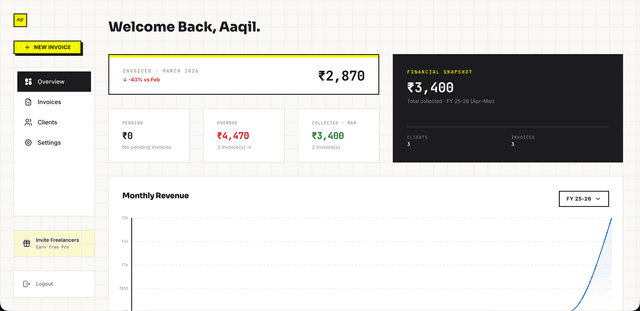
Welcome Back,
John.
Invoiced · March 2026
₹2,40,000
↑ +23% vs Feb
Financial Snapshot
FY 26-27₹6,20,000
Total collected · FY 26-27
Clients
18
Invoices
42
Pending
₹85,000
3 Invoice(s) →
Overdue
₹40,000
1 Invoice(s) →
Collected · Mar
₹1,15,000
4 Invoice(s)
Needs Attention
View All →Priya Sharma
INV26-041 · Branding
Arjun Co.
INV26-035 · UI Redesign
01
Type new. Fill it in.
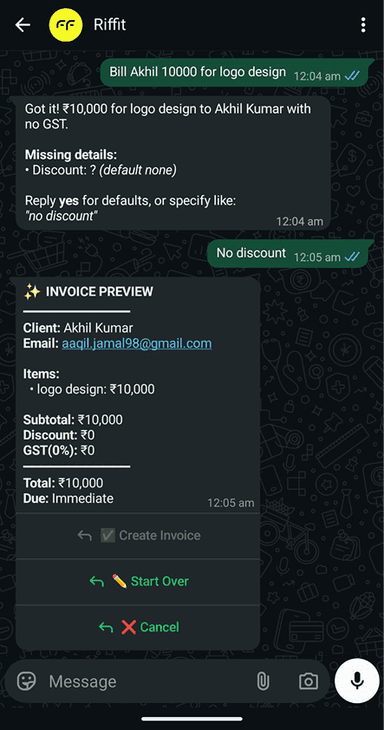
Send "new" and a short form opens inside the chat. Pick a saved service and its rate fills in. On Pro, one sentence or a voice note does it instead (10 a day).
02
Check it. Save it.
You see the whole invoice, discount, due date and total, before anything is saved.
03
One tap. Sent.
Send the PDF by email on any plan, or on WhatsApp on Pro. Add your UPI ID and it carries a payment link to your own account.
04
Everything. Tracked.
Every invoice, client and payment status on your dashboard. A reminder email goes out on the due date, and Pro chases before and after it too.
How it works
One chat.
Professional invoice.
Riffit
online
Welcome Back,
John.
Invoiced · March 2026
₹2,40,000
↑ +23% vs Feb
Financial Snapshot
FY 26-27₹6,20,000
Total collected · FY 26-27
Clients
18
Invoices
42
Pending
₹85,000
3 Invoice(s) →
Overdue
₹40,000
1 Invoice(s) →
Collected · Mar
₹1,15,000
4 Invoice(s)
Needs Attention
View All →Priya Sharma
INV26-041 · Branding
Arjun Co.
INV26-035 · UI Redesign
01
Type new. Fill it in.
02
Check it. Save it.
03
One tap. Sent.
04
Everything. Tracked.
Features
What Riffit does.
Built around how Indian freelancers actually work, not how SaaS companies think they work.
Invoice Priya 40k for branding
2:31 PMClient: Priya Sharma
Items: Branding: ₹40,000
Look right?
Tap Save Invoice or Edit.
✅ Save Invoice
2:32 PM✅ Invoice INV26-001 saved.
Send to Priya by Email or WhatsApp?
📧 Invoice sent to priya@email.com
I'll tell you when she views it.
Type new and a short form opens in the chat, on every plan. Pick a saved service and its rate fills in. On Pro, one line or a voice note does it.
Signed before
the work starts.
Send a contract by email, or on WhatsApp on Pro. Your client signs from the link with a one-time code. No DocuSign account.
See contractsStop chasing.
Start tracking.
Due-date email on Free. Full schedule on Pro.
Know who owes
you, always.
Pay via QR.
Straight to you.
Clients pay your own UPI from the invoice. You mark it paid when it lands.
A signature, on
the record.
Every signed contract comes with an audit-trail certificate you keep: who signed, when, and that it was OTP-verified. Structured to address the §65B / §63 requirements.
See contractsQuote it before
you invoice it.
Made in WhatsApp or on the dashboard, accepted from a link, turned into an invoice in a click.
See quotations →Quotation
QUO26-014
SentQuotation
QUO26-014
SentContract
CON26-022
SignedInvoice
INV26-051
SentQuotes, contracts, invoices.
One place.
Invoice and quote from WhatsApp, build contracts on the dashboard. GST, TDS and hours like 2.5 on every plan.
Quotes, contracts, invoices.
Start free.
TRY RIFFIT FREEThe real costSix tools. One job.Typed six times.An invoice in Figma. A contract in Illustrator. A rush quote in Canva. Approvals in Gmail. Tracking in Notion. A QR in WhatsApp.
One threadOne tool. One record.Nothing to re-type. The quote becomes the contract becomes the invoice, and the client, the line items and the terms come with it.
Early Access
What early users are saying
Unfiltered feedback from early users.
"Totally worth it. Generating invoices is easy, keeping track is easy, and I don't have to worry about follow-ups anymore because the reminders go out automatically. Refreshing change from the usual invoicing tools."

"Have been using it for a while, can confirm this is the most fun invoicing solution out there. Invoicing usually feels like a chore, this one doesn't."

"I used to spend 2 hours every week on invoices. Now it's literally one WhatsApp message and done. I actually send invoices on time now."

"Finally an invoicing tool that speaks my language. No complicated forms, no setup. Just message and invoice."

"This is amazing and pretty much sure it solves one of the biggest pain point for freelancers."

"Riffit has been such a big help in terms of invoicing. It really makes the process so much faster and easier. Actually solves a day to day problem."

"I used to spend 2 hours every week on invoices. Now it's literally one WhatsApp message and done. I actually send invoices on time now."
"Finally an invoicing tool that speaks my language. No complicated forms, no setup. Just message and invoice."
"This is amazing and pretty much sure it solves one of the biggest pain point for freelancers."
Questions
Frequently asked
Common questions, honest answers.
Riffit (riffit.in) is a WhatsApp-first invoicing tool for Indian freelancers that handles quotations, contracts and invoices. To invoice or quote, type new or quote on WhatsApp and a short form opens inside the chat. On Pro you can type one sentence instead, or send a voice note for an invoice. Riffit builds a professional PDF in under two minutes, and an invoice can carry a UPI link to your own account. No app to install. Contracts are built on the dashboard, where there is room for terms and signatures, and a signed one becomes an invoice from the chat or the dashboard. WhatsApp and the dashboard are two views of the same data.
Yes, and they're unlimited on both plans. Type quote on WhatsApp and the same short form opens in the chat, or build one on the dashboard. On Pro, one sentence works too. Your client opens a link and accepts it in their browser. No account, no signup, no code to type. If they want something changed first, they say so from the same page, and you revise and send v2 under the same quote number. When they accept, Riffit messages you on WhatsApp with buttons to create the invoice or a contract, and the line items and terms carry across.
Yes. Draft one from the Project template on your dashboard and send it by email, or on WhatsApp on Pro. Your client e-signs with a one-time code, and nobody needs a DocuSign account. Your client gets the signed PDF. You keep a separate audit-trail certificate, downloadable from the contract. A signed contract becomes an invoice with the client and the amount carried across. 3 contracts are free for life, unlimited on Pro.
Yes, that is how Riffit is built. Your client accepts a quote from a link, and the accepted quote becomes a contract or an invoice in one click, with the client, line items and terms carried across. A signed contract becomes an invoice the same way. Quotes and invoices start in WhatsApp or on the dashboard. Contracts are built on the dashboard and e-signed by the client.
Under two minutes from "new" to sent. Type new on WhatsApp, pick the client, and pick a saved service so its details and rate fill in. Riffit adds your business details, GST number and payment info from your profile and shows you the full preview. Tap Save, then choose how it goes out: email on every plan, or WhatsApp on Pro.
No. On every plan, type new (or quote) and a short form opens inside the chat, with your clients and saved services to pick from. On Pro you can skip the form: describe the work in plain English or Hinglish, something like "invoice Priya 40k for brand design", or send a voice note for an invoice, and Riffit's AI fills in the rest, up to 10 a day. Either way you see the full preview before anything is saved.
Yes. Free includes unlimited quotations, 5 invoices a month, 3 contracts in total, up to 5 clients and 3 saved services, with no credit card. You get the in-chat WhatsApp form, the web dashboard, PDFs with a small Riffit badge, email delivery and a reminder email on the due date. Pro is ₹249/month, or ₹199/mo billed yearly, and adds unlimited invoices, clients, contracts and services, AI from a sentence or a voice note, your logo and colour on PDFs, WhatsApp delivery and the full reminder schedule. Every new account starts with a 14-day Pro trial.
Riffit pauses invoice creation when you reach 5. Every invoice you create counts, drafts included. Your existing invoices stay live, and clients can still view and pay them. The count resets on the 1st of every month. Need more this month? Go Pro any time for unlimited invoices.
Add your UPI ID once and every invoice carries a UPI link and QR code, plus your bank details if you add those. Your client pays from any UPI app, like Google Pay, PhonePe, Paytm or BHIM, straight into your own account. No Riffit account needed on their end. Riffit never touches the money and cannot see the payment, so you mark the invoice paid when it lands.
Yes. On the free plan Riffit emails your client one reminder on the due date. Pro runs the whole schedule for you, before the due date, on it, and after, over both email and WhatsApp, and you choose how far out it goes. The dashboard shows a timeline of every reminder sent.
Yes. The web dashboard at app.riffit.in shows every quotation, contract and invoice with its status (sent, viewed, accepted, paid, overdue). Per-client views show the full history, payments and outstanding amounts. WhatsApp handles creation. The dashboard handles tracking. Same data, two surfaces.
No. Riffit works with the WhatsApp you already have, personal or Business, on an Indian (+91) number. Sign up at app.riffit.in with that number, then chat with Riffit on WhatsApp from it. No SIM swaps. No Meta API setup on your side. No app to download.
Because invoicing tools don't fail because they're bad. They fail because using them feels like a chore. Open laptop, log in, fill fields, set tax, preview, download PDF, attach to email, send. So invoicing gets pushed to "later." Tomorrow morning. After dinner. The invoice that should go out today goes out two days late. Riffit isn't a better invoicing app. It's a way to skip the process. Open the chat you already use, fill one short form, invoice sent before the traffic signal turns green.
Want it step by step, with videos? Read the help guides
Your next invoice
Stop putting off
the invoice.
You finished the work. The invoice shouldn't take longer than a WhatsApp message. Because with Riffit, it doesn't.

Early Access
Building alongside real businesses
Early-access businesses run on Riffit today, including my own studio, 11pixels.